Meet Otto · powered by Anthropic’s Claude
Ask in plain English. Otto does the work.
Run backtests, scan the market, analyze options data, build trades, understand your portfolio, and navigate ORATS, all through one conversation.
1One toggle, whole new sidebar
Flip Dashboard to Agent on any page and Otto opens with your context along for the ride.
- 1
One toggle, whole new sidebar. Flip Dashboard to Agent on any page and Otto opens with your context along for the ride.
- 2
Ask anything. Options, a symbol, a backtest: one input drives 95 tools across the platform.
- 3
It ran the backtest itself. Win rate, P&L, drawdown: Otto submitted the run, waited for it, and pulled the numbers.
- 4
Then it tells you the truth. A quick read on the risk, the drivers, and what to test next.
- 5
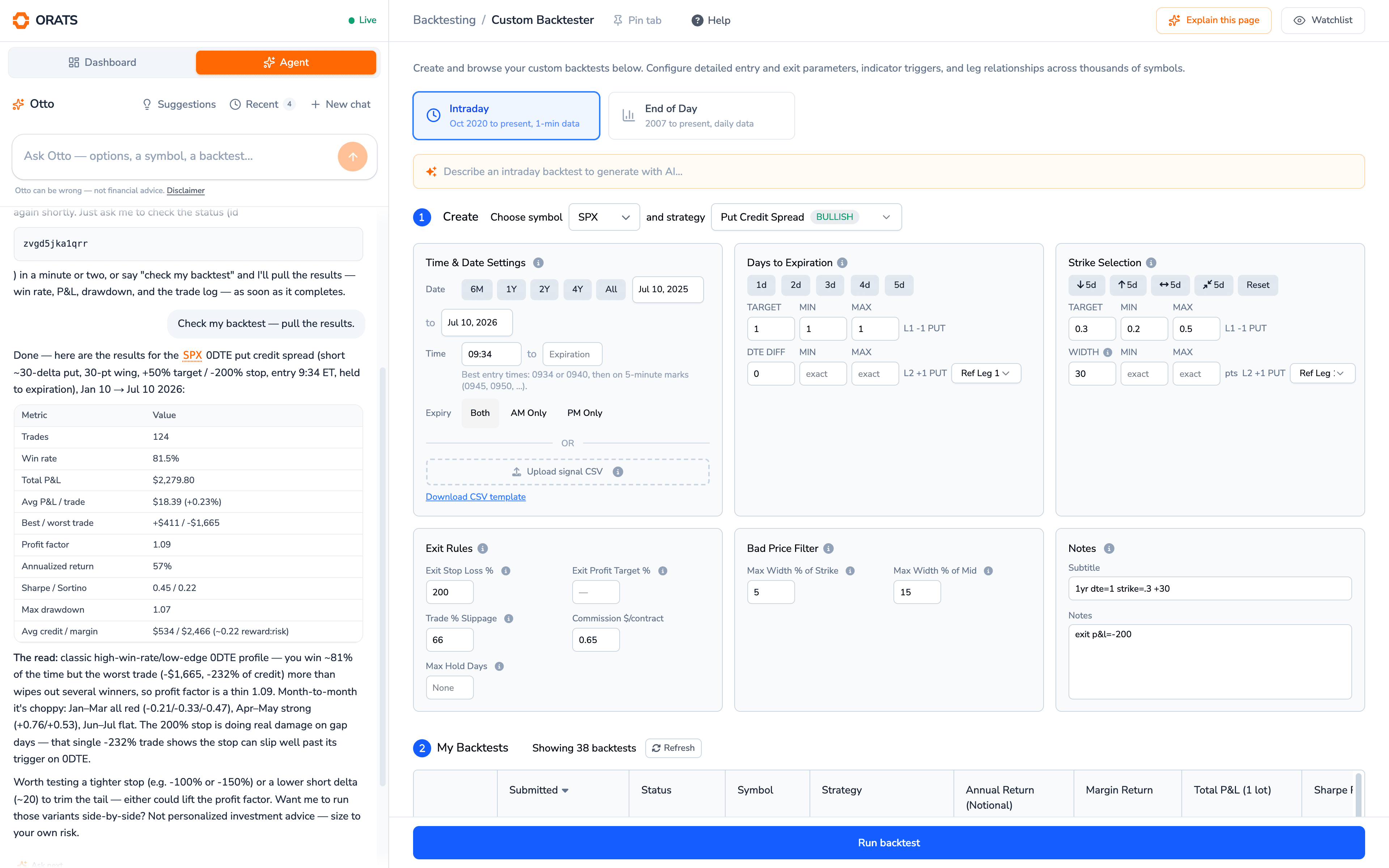
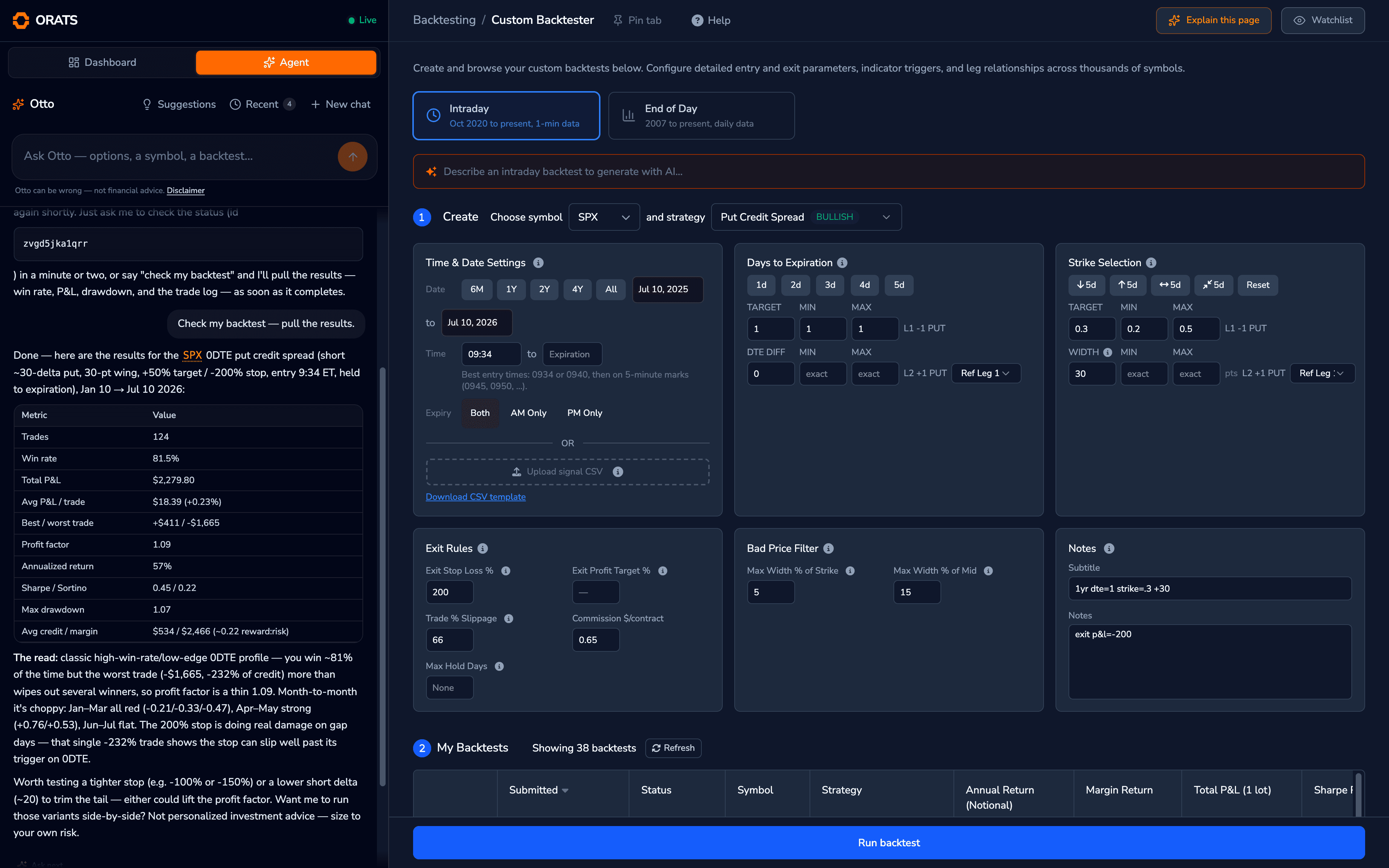
The same tools you use. Otto fills the real backtester form, so you can take over and tweak anytime.
- 6
Explain this page. One click anywhere in the dashboard and Otto walks you through what you're seeing.
Ask Otto anything
Run an SPX 0DTE put credit spread backtest over the last 6 months
Scan for high IV rank names reporting earnings this week
What's my portfolio delta right now?
Build a QQQ iron condor around the 16 delta and paper trade it
Why is NVDA's implied move so high?
Explain what I'm seeing on this page
Chart SPY 30-day implied vol against realized
Compare my saved backtests: which has the best risk-adjusted results?
What does slope percentile mean?
Show me today's biggest vol movers
Find cheap calendars on liquid names
Why is this volatility surface shaped this way?
Paper trade a TLT strangle, one lot
Show me liquid put spreads with a 70% chance of profit
Analyze my positions for volatility and earnings exposure
Open the Option Scanner with the filters you just used
Compare my saved backtests: which has the best risk-adjusted results?
What does slope percentile mean?
Show me today's biggest vol movers
Find cheap calendars on liquid names
Why is this volatility surface shaped this way?
Paper trade a TLT strangle, one lot
Show me liquid put spreads with a 70% chance of profit
Analyze my positions for volatility and earnings exposure
Open the Option Scanner with the filters you just used
Run an SPX 0DTE put credit spread backtest over the last 6 months
Scan for high IV rank names reporting earnings this week
What's my portfolio delta right now?
Build a QQQ iron condor around the 16 delta and paper trade it
Why is NVDA's implied move so high?
Explain what I'm seeing on this page
Chart SPY 30-day implied vol against realized
Otto drives the platform
Not just answers. Actual workflows.
Otto can run the analysis, show you the result, and open the underlying ORATS tool with the inputs already populated. Review the settings, make changes, and continue working from there.
1Ask
One plain-English request, as specific as you want to be.
“Find high-IV earnings trades with positive historical edge.”
2Otto works
It queries ORATS data, scanners, backtests, and proprietary analytics, picking the tools itself.
3See the result
Tables, stats, and charts land directly in the conversation, with every tool call visible.
4Keep working
Open the populated Scanner, Backtester, Trade Builder, or other ORATS tool and take over.
- Access ORATS public and private APIs
- Run analyses and return results inline
- Open ORATS tools
- Populate tool inputs automatically
- Explain the page you're viewing
- Use your ORATS data and saved work, where permissions allow
Real conversations
Start with a prompt. Continue with the full tool.
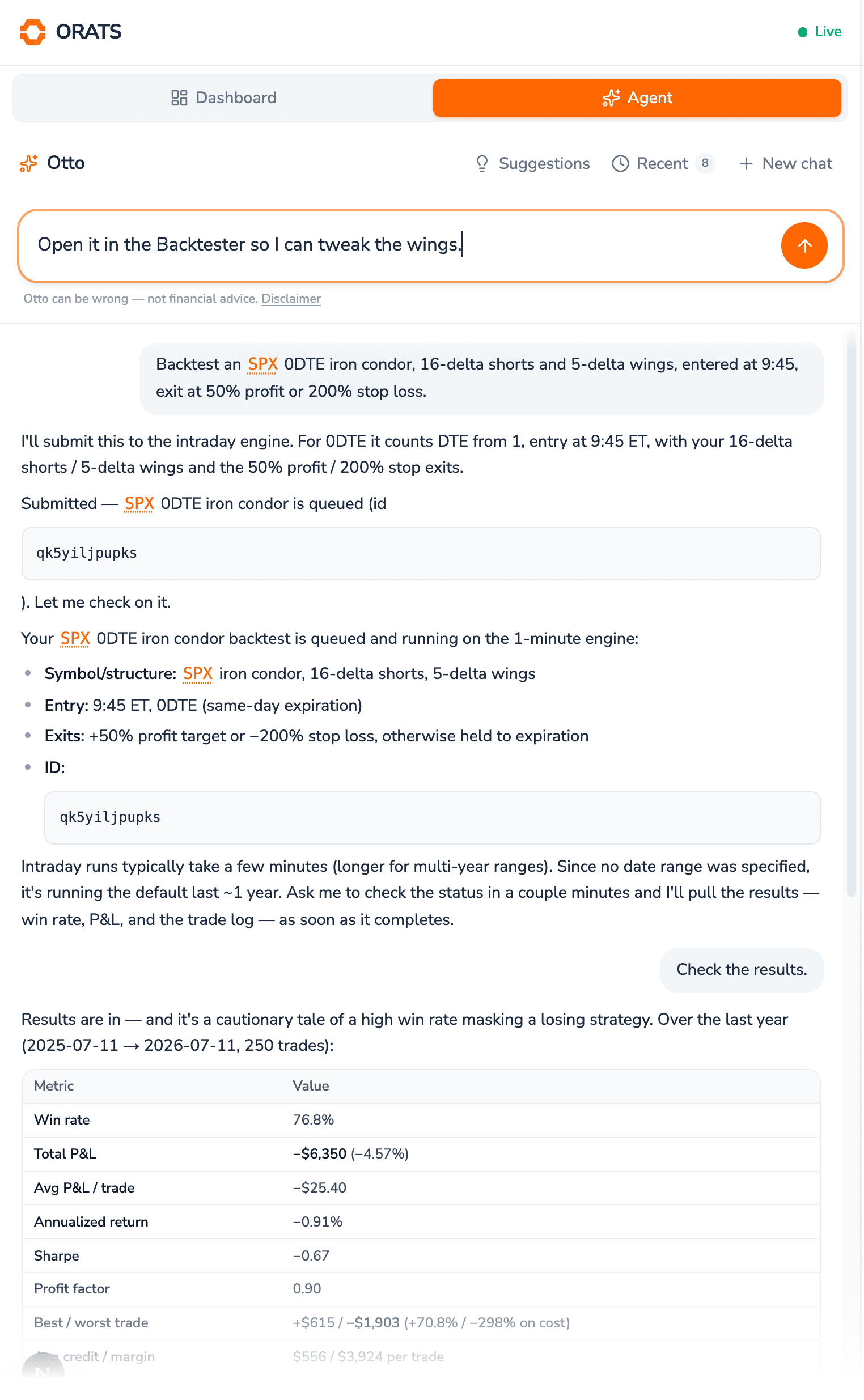
Otto doesn’t trap your research inside a chat window. These are real screenshots of one conversation: Otto ran the backtest from a single sentence, and one sentence more opened the Custom Backtester with every input already populated. Inspect the parameters, adjust the analysis, and continue working visually.
“backtest an SPX 0DTE iron condor…” → it runs one
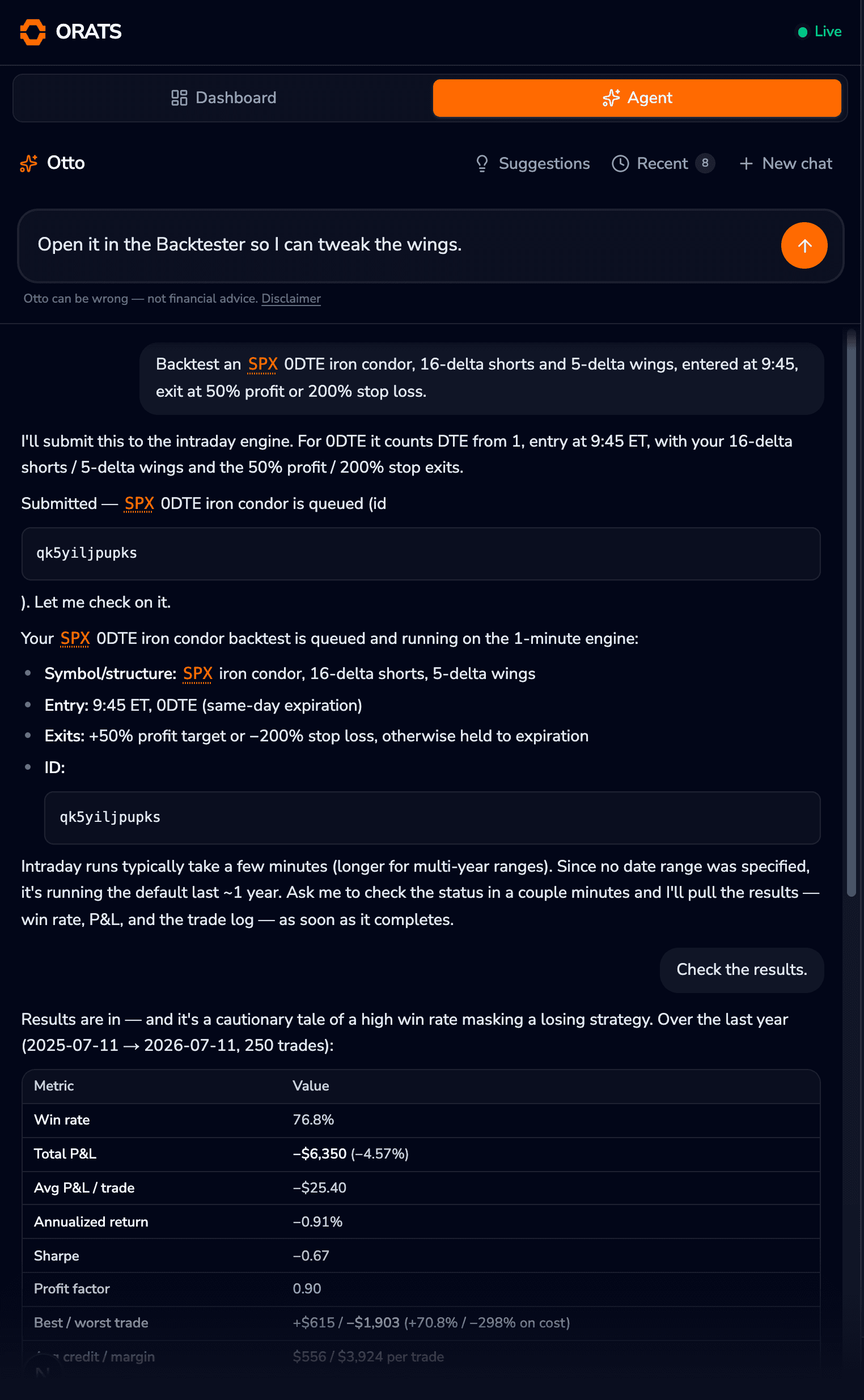
1One sentence, fully specified
Strategy, deltas, wings, entry time, and both exits: Otto parses all of it and picks the intraday engine.
- 1
One sentence, fully specified. Strategy, deltas, wings, entry time, and both exits: Otto parses all of it and picks the intraday engine.
- 2
A real run, tracked by id. Submitted to the 1-minute engine with a job id; Otto checks the status and pulls the stats when it lands.
- 3
Then it tells you the truth. A 76.8% win rate masking a losing year: the honest read, every number from the real run.
- 4
The handoff is one sentence. Typed and ready to send: Otto opens the Custom Backtester with this exact configuration loaded.
“open it in the Backtester…” → the form arrives filled
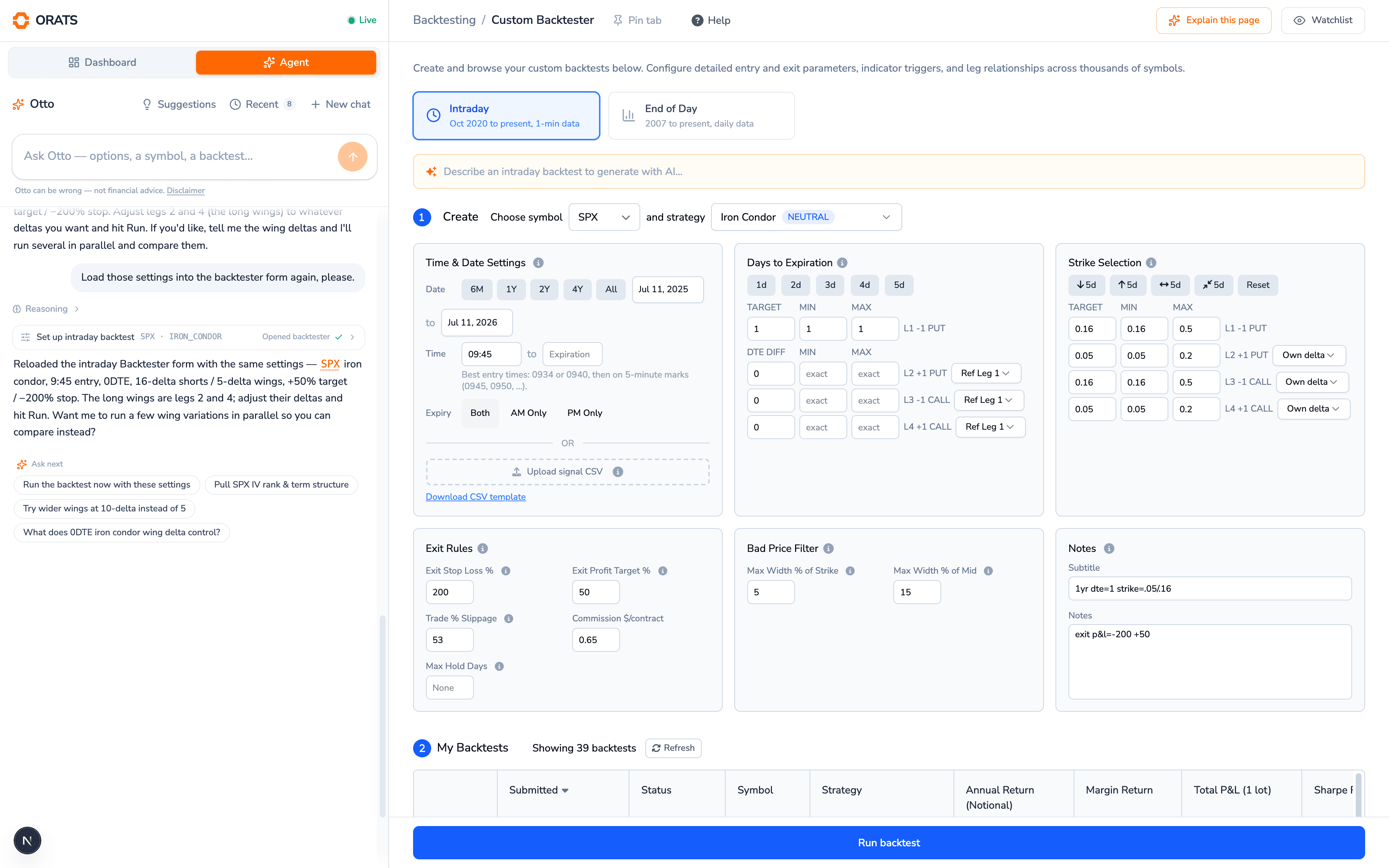
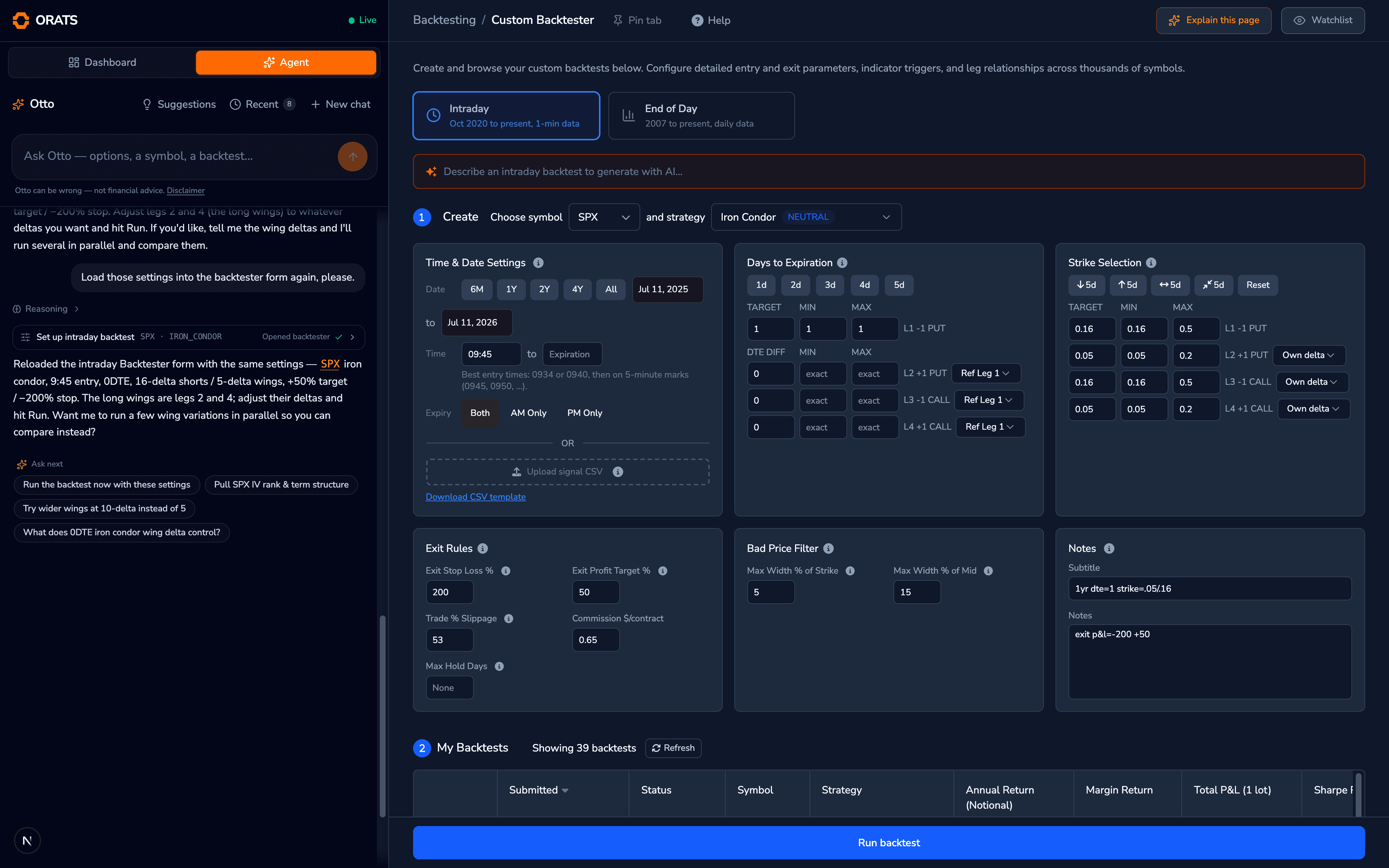
1Watch it drive the platform
The tool call sits right in the conversation: set up intraday backtest, opened and prefilled.
- 1
Watch it drive the platform. The tool call sits right in the conversation: set up intraday backtest, opened and prefilled.
- 2
The real form, filled by Otto. SPX iron condor, straight from the chat: nothing to retype, nothing to remember.
- 3
Every leg, every delta. 16-delta shorts and 5-delta wings on all four legs, exactly as backtested.
- 4
Your rules carried over. The 50% profit target and 200% stop came along too. Change anything and hit Run.
Same conversation, continued: the tool call is visible in the sidebar, and the intraday form arrives with the entry time, deltas, wings, and exits prefilled. Adjust the wings and hit Run, or ask Otto to fire off variants in parallel.
- Sees what you see
- Otto reads the page you're on. Click “Explain this page” anywhere in the dashboard and it walks you through the screen, your data included.
- Shows its work
- See the tools Otto used, the data it queried, the parameters it selected, and the results it produced: every tool call is a card you can expand.
- Paper trades, never live
- Otto places paper trades only and never sends a live order. It reads your positions and balances, but every live trade stays in your hands.
Prompt library
Questions. Analyses. Hands on the tools.
Otto handles all three. Every prompt below opens Otto in the dashboard with that exact workflow ready to run.
Questions Otto answers
Grounded in the ORATS knowledge base and the page you're on.
Analyses Otto runs
Real backtests, scans, and portfolio math, executed for you.
- “Backtest a 30-delta SPY iron condor entered 45 DTE and closed at 50% profit.”Try this prompt
- “Find stocks reporting earnings next week where implied volatility is historically expensive.”Try this prompt
- “Compare my last five saved backtests and tell me which has the best risk-adjusted results.”Try this prompt
- “Analyze my current positions for volatility and earnings exposure.”Try this prompt
Tools Otto opens and populates
The handoff: Otto's work, loaded into the real interface.
Already subscribed? Each prompt drops you straight into Otto. New to ORATS? Your prompt survives signup and is ready to run the moment you land in the dashboard.
Page awareness
Ask about what you’re looking at.
Otto understands where you are in the ORATS platform. Ask it to explain a chart, parameter, metric, or page, and then ask it to take the next step.
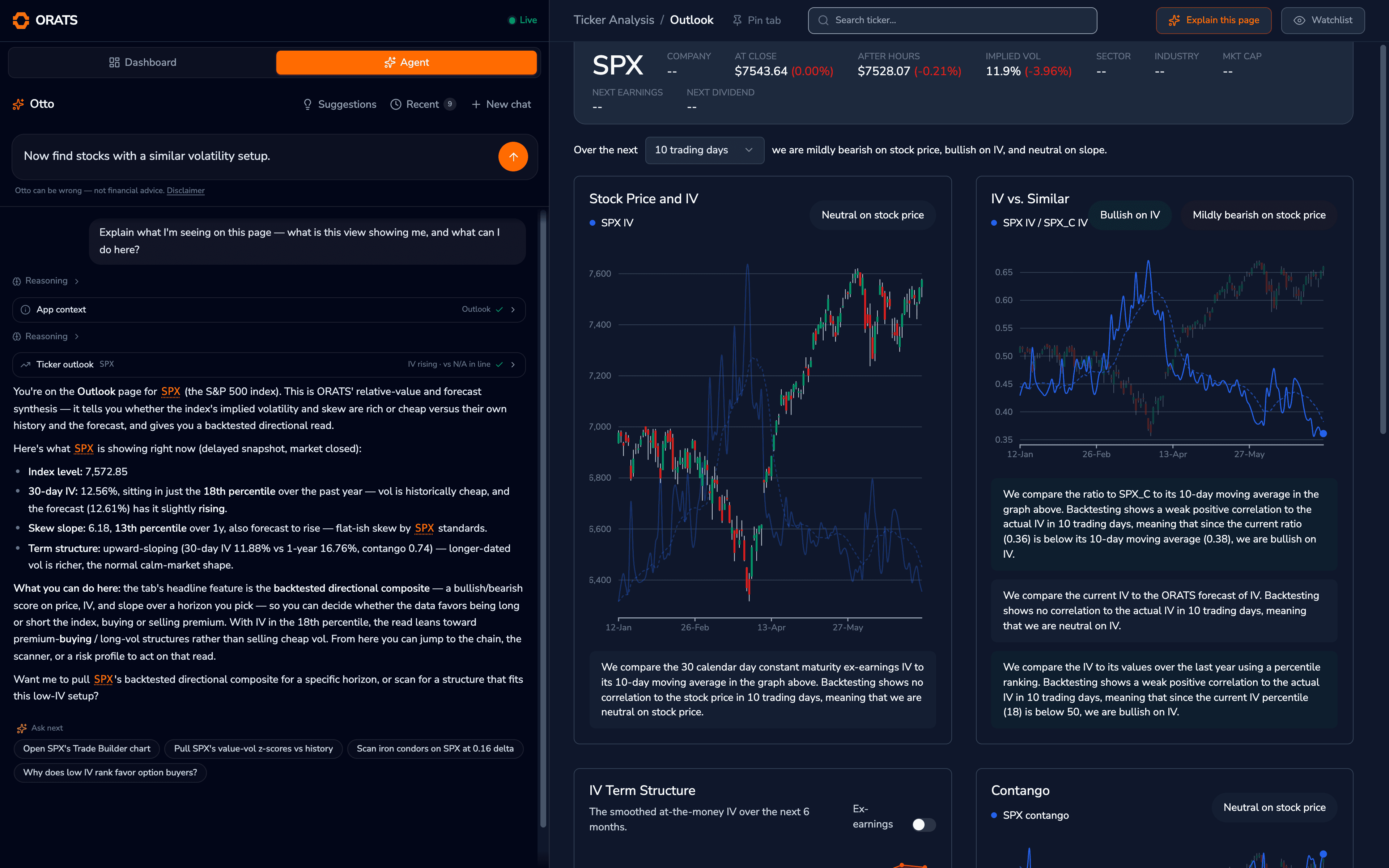
Every dashboard page also has a one-click Explain this page shortcut. This is it, for real, on the SPX Outlook: Otto read the page and answered with its numbers.
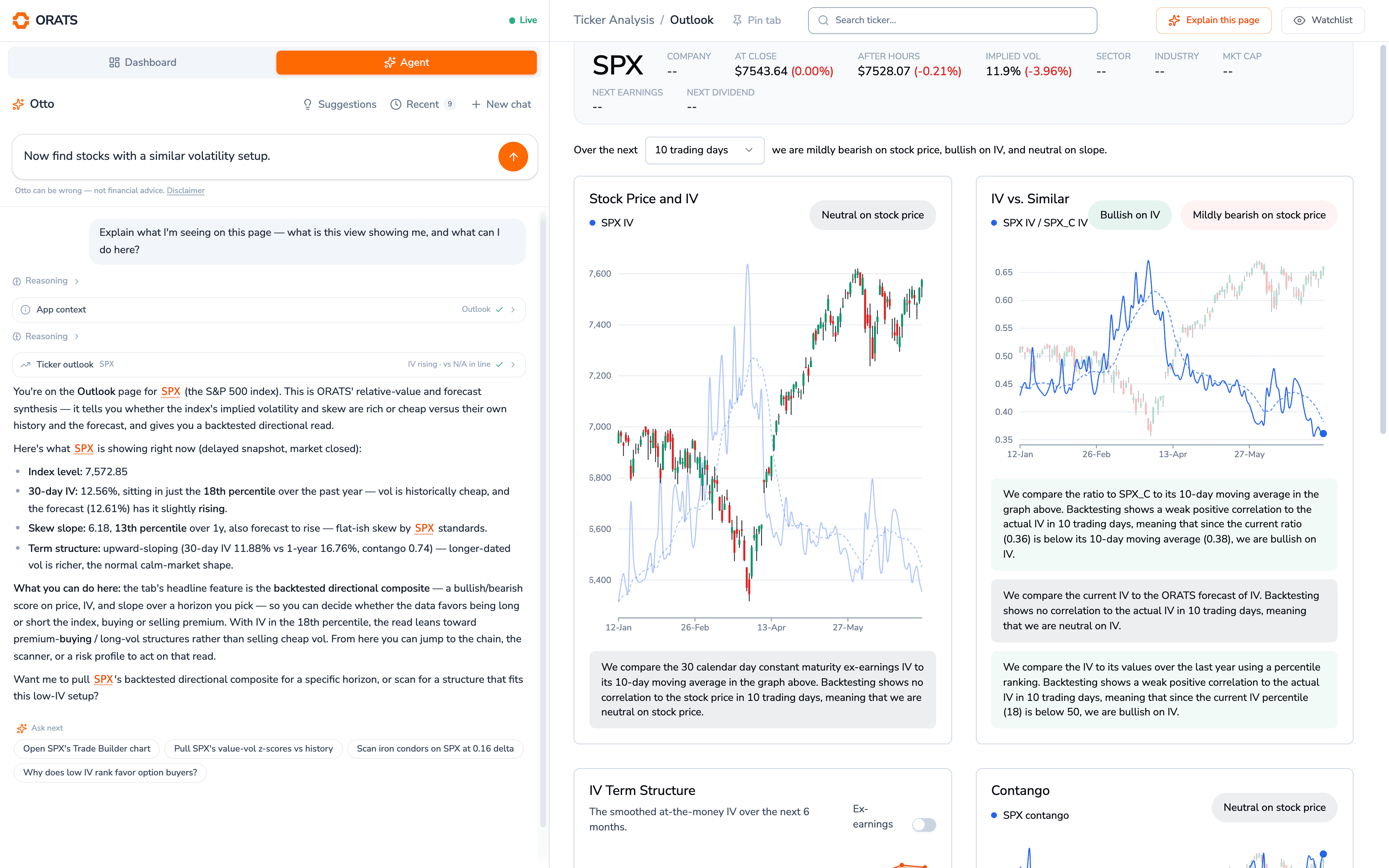
1One click, any page
The Explain this page shortcut opens Otto with your screen already in context.
- 1
One click, any page. The Explain this page shortcut opens Otto with your screen already in context.
- 2
Otto reads the page first. The App context call pulls the Outlook view you're on, so the answer is about your screen, not options in general.
- 3
Real numbers from the view. Index level, IV percentile, skew slope, term structure: every figure in the answer comes off this page.
- 4
It knows the headline feature. Otto steers you to the Outlook's backtested directional read and how to act on it.
- 5
The next step, ready to send. A follow-up typed in the real input: one send and Otto scans for stocks with a similar setup.
Capabilities
95 tools. One conversation.
Otto is the natural-language layer over the whole platform: you don’t need to know which tool to use, where it lives, which filters to set, or which endpoint to query. Every major surface of the dashboard is a tool Otto can drive.
- Backtesting
Runs end-of-day and intraday backtests, browses the 300M+ backtest library, checks run status, and loads winners into the Strategy Optimizer.
“Backtest a 30-delta SPY put credit spread since 2015”
- Scanning
Configures and runs the Option Scanner and Stock Scanner, saves scans you like, and re-runs your saved ones.
“Find straddles on stocks reporting earnings this week”
- Trade building
Builds multi-leg trade tickets, opens them in the sidebar ready to send, and places paper trades so you can track the idea risk-free.
“Build an IWM iron condor and paper trade one lot”
- Portfolio
Reads your positions, balances, and open orders across connected brokers, and analyzes your risk profile on demand.
“What's my delta exposure if SPY drops 2%?”
- Market intelligence
Top movers, unusual options activity, largest trades, earnings calendars, and news, synthesized instead of listed.
“What moved vol today and why?”
- Charts & data
Opens option chains, charts values with trendlines, and queries every ORATS data endpoint: live, delayed, and historical.
“Chart NVDA's IV rank over the past year”
- Navigation
Drives the dashboard for you: opens pages, drawers, chains, and tabs, so the answer arrives already on screen.
“Open the option chain for the SPX weeklies”
- ORATS knowledge
Explains every indicator, methodology, and metric on the platform, drawing on the full ORATS knowledge base.
“How does ORATS smooth its vol surfaces?”
Building your own agent instead? The ORATS CLI plugs Claude Code and Codex straight into the same options data Otto uses.
orats cliWhy not a general chatbot?
Built on ORATS. Not the open internet.
A general AI can talk about options. Otto works inside the platform your research lives in: the data, the tools, and your own saved work.
- Proprietary options data
- ORATS volatility surfaces, Greeks, theoretical values, historical options data, earnings analytics, and derived indicators.
- Direct tool access
- Otto runs ORATS tools rather than telling you how to use them: backtests, scans, charts, and paper trades.
- Your ORATS context
- Otto can work with your saved backtests, scans, positions, and other account data where available.
- Interactive handoff
- Open the actual ORATS tool with Otto's work already populated, and keep going by hand.
Word of mouth
Traders on Otto.
Real notes from the support inbox, first names only.
“I have been learning your screen set up and nomenclature using Otto and I have got to tell you it is by far the best automated help program I have experienced. Excellent job.”
“I am extremely impressed by ORATS! I have been using the AI tool to learn more about the terminology and tools on the website, and it has been very helpful.”
“Otto has been very helpful (and very good as sales rep!)”
Pricing
Otto comes with the subscription you already have.
One flat subscription covers every conversation. Otto ships inside ORATS Trading Tools alongside every other tool on the platform.
Trading Tools
$99/ month
Individual license. Professional license $199 / user / month.
Everything included:
Does not include ORATS Data API access. Cancel within 24 hours of signup for an automatic full refund.
FAQ
Otto, answered.
What is Otto?
Can Otto open and set up ORATS tools for me?
Can Otto place real trades with my money?
What AI model powers Otto?
Can Otto see my portfolio?
Are Otto's answers financial advice?
Does Otto cost extra?
Ask Otto something hard.
“Otto is great, way more helpful than general AIs like Perplexity as it has way more context!”