Data API
Wednesday, May 27th 2026
Introducing the ORATS CLI: Better Options Data for Your AI Coding Agent
Give your AI coding agent live implied vol surfaces, forecast volatility, and intraday history - then ask your research questions in plain English.
Summary
The ORATS CLI provides AI coding agents with live, institutional‑grade options data—including implied volatility surfaces, forecast volatility, historic and intraday data—through a simple npm‑installed command line tool, enabling agents to answer complex options research questions in plain English by mapping queries to API endpoints, registering skill bundles, and handling data retrieval, processing, and presentation without requiring deep domain knowledge.
Better Options Data for Your AI Coding Agent
Frontier models already understand options theory at a conceptual level. What they lack is current market data, since training data is assembled months before a model is deployed. The questions that matter most in options research cannot be answered from training data alone. The shape of this morning's smoothed implied vol surface, an upcoming earnings move set against the last twelve realized ones, the minute-by-minute path of a recent CPI reaction: each requires live data behind APIs the agent cannot reach on its own.
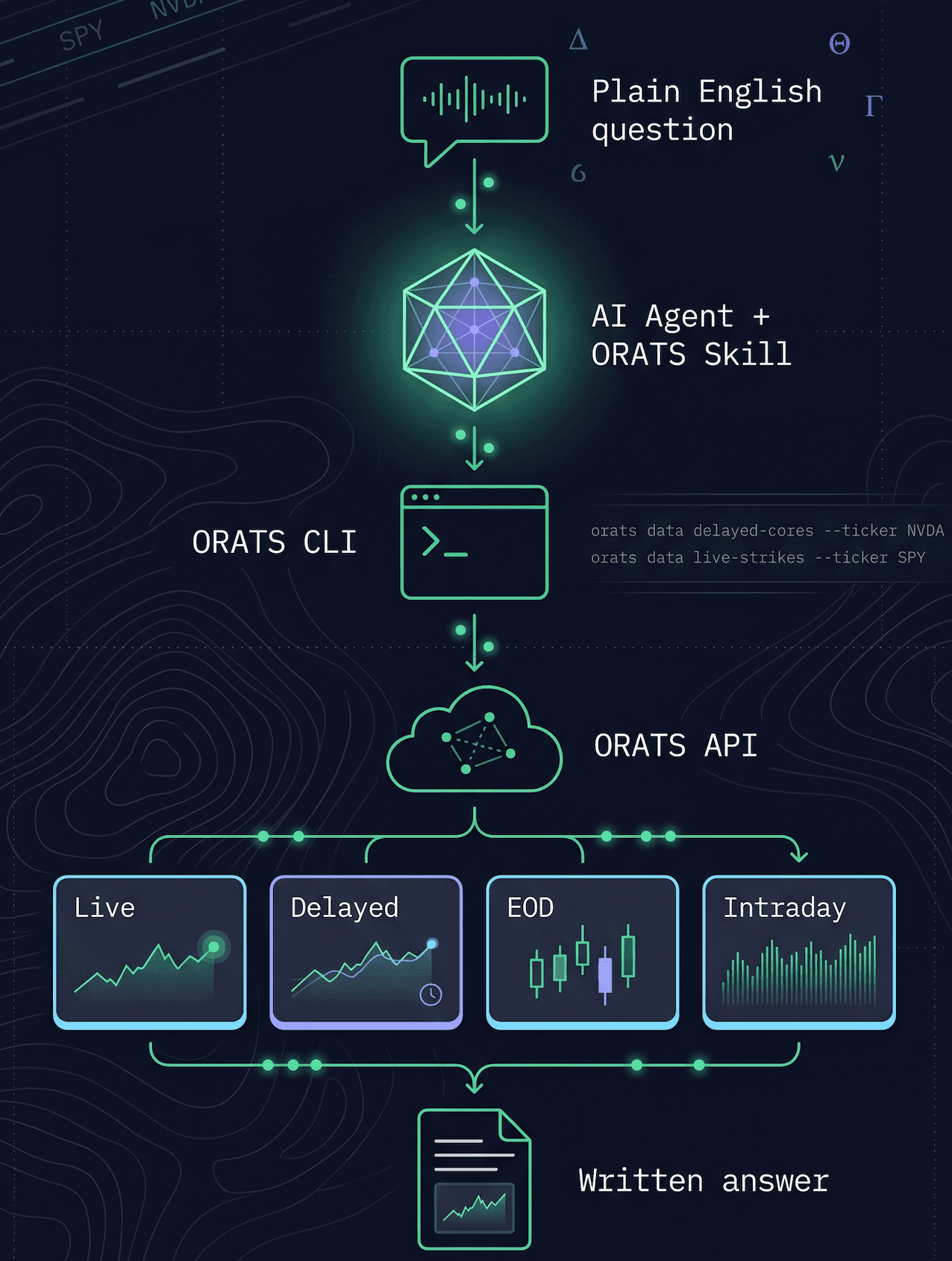
ORATS is making institutional-grade options data agent-native, starting with @orats/cli. The CLI is a single command, installed through npm, that exposes every ORATS endpoint through an interface usable by AI coding agents and human researchers alike. Once it is installed, with the skill bundle registered and an API token configured, your agent has direct access to the full ORATS catalog: smoothed implied volatility surfaces, our proprietary forecast volatility, end-of-day options history back to 2007, and one-minute intraday data back to August 2020. Every endpoint is callable from Claude Code, Codex, or any other agent that runs shell commands.
For you, the experience is conversational. You pose a research question in plain English, and the agent runs the analysis.
Installation
We have two separate installation instructions depending on your operating system:
Mac:
- Launch the terminal. If node --version doesn't return v20.x.x or higher, install the LTS from nodejs.org — the installer handles everything. Once you’ve installed, you will need to restart the terminal.
- Then install the CLI:
npm install -g @orats/cli- Get an API token at orats.com/ai-agents. Then, set it globally. Replace your_token_here with your ORATS API token. Make sure to retain the quotes around the token:
echo 'export ORATS_TOKEN=your_token_here' >> ~/.zshrcsource ~/.zshrc- Finally, register the skill bundle and verify:
orats skillsThe skill teaches your AI agent which endpoint maps to which kind of question and what each returned field means; it's required for any conversational workflow. Now that the installation is complete, try out the following command:
orats data live-summaries --ticker SPYIf that returns a row of numbers for SPY, everything is wired correctly.
- Optional - Use in Claude Code: We recommend Claude Code for agentic use of the ORATS CLI. The following examples assume you have Claude Code or another agent installed in your terminal. Please follow the download instructions here: https://code.claude.com/docs/en/quickstart. You may need to install the orats skills again after you install Claude for the first time.
Windows:
- Launch Powershell. If node --version doesn't return v20.x.x or higher, install the LTS from nodejs.org — the installer handles everything. Once you’ve installed, you will need to restart Powershell.
- Then install the CLI:
npm install -g @orats/cli- Get an API token at orats.com/ai-agents. Then, set it globally. Replace your_token_here with your ORATS API token. Make sure to retain the quotes around the token:
[Environment]::SetEnvironmentVariable("ORATS_TOKEN", "your_token_here", "User")$env:ORATS_TOKEN = "your_token_here"- Finally, register the skill bundle and verify:
orats skillsThe skill teaches your AI agent which endpoint maps to which kind of question and what each returned field means; it's required for any conversational workflow. Now that the installation is complete, try out the following command:
orats data live-summaries --ticker SPYIf that returns a row of numbers for SPY, everything is wired correctly.
- Optional - Use in Claude Code: We recommend Claude Code for agentic use of the ORATS CLI. The following examples assume you have Claude Code or another agent installed in your terminal. Please follow the download instructions here: https://code.claude.com/docs/en/quickstart. You may need to install the orats skills again after you install Claude for the first time.
Ask in plain English
Once the CLI is installed and the ORATS skill is registered, your AI coding agent becomes a working options research interface. The skill teaches the agent which endpoint to call for which kind of question, what each returned field means, and how to combine results when a single question spans more than one call. The CLI is the medium the agent uses to make those calls.
From your side, none of that matters. You ask a question in everyday English. The agent translates it into the right calls, runs them, and produces the answer in whatever form the question called for: a written summary, a small table, or a saved file.
A few prompts make the workflow concrete. Each is something you can ask Claude Code or Codex with nothing more than the install behind it.
What is the implied move on TSLA before next earnings, and how does it compare to the last four realized moves?
Across the universe, which names are trading the most expensive 30-day vol relative to ORATS' forecast right now? Show me the top ten.
NVDA reports earnings later. Walk me through the setup: term structure, the implied move against the last six realized moves, and the front-week skew at 25 delta.
Pull SPY's vol tape minute by minute through the August 5, 2024 carry unwind and save it as a CSV I can plot.
What does AAPL's IV term structure look like right now?
Has any S&P 100 name had its implied earnings move underprice the realized one for four consecutive quarters?
The agent handles every step of the work in each case: picking the endpoints, composing the flags, running the queries, parsing the response, and producing the final summary or file. Follow-ups work the same way. A refined screen, a clarifying question, or a change of direction all happen within the same conversation, with no documentation to look up along the way.
The result is worth pausing on. Serious options research has historically required either a dedicated quant team or an analyst with deep domain knowledge: the vendor's schema, the analytical conventions of the field, and the post-processing techniques that turn raw data into an answer. With the CLI and skill in place, the only remaining requirement is the question. Anyone who can articulate a research question with reasonable specificity can now run the analysis behind it.
Using the CLI directly
If you prefer a shell to a chat interface, or want to see what the agent is doing under the hood, the CLI works just as well on its own. The command shape is always the same: orats data <endpoint> plus whatever flags the endpoint accepts. There is also a separate orats glossary command for field lookups.
The IV term structure on SPY:
orats data live-summaries --ticker SPY --fields stockPrice,iv30d,iv60d,iv90dA filtered options chain on AAPL, narrowed to expirations 25 to 35 days out and strikes between 30 and 70 delta:
orats data live-strikes --ticker AAPL --dte 25,35 --delta .30,.70The implied earnings move on NVDA next to its last six realized moves:
orats data delayed-cores --ticker NVDA \\
  --fields ticker,impliedMove,ernMv1,ernMv2,ernMv3,ernMv4,ernMv5,ernMv6
Three discovery helpers cover most of what else you will need: orats glossary <field> for definitions, units, and methodology notes; orats data <endpoint> --list-fields true for the fields available on an endpoint; and orats data <endpoint> --help for the flags it accepts.
Longer workflows (dispersion screeners, surface dumps, intraday event-study replays, basket dashboards, backtest setup) are covered in a follow-up post.
For agents that prefer MCP over the local skill format, orats mcp add --agent claude-code registers the CLI directly. For anything else, orats --llms emits a complete manifest of every command, suitable for any tool that needs a description of the CLI.
Where to go next
Start with an API token at orats.com/ai-agents. The same page documents each one with searchable filters and copyable examples. Full API reference is at orats.com/docs.
The CLI is the first step. Once it is installed and the skill is registered, your agent's options analysis no longer depends on what was in its training data. It runs on live ORATS data: current, structured for real research, and trustworthy enough for production use. Bug reports and feature requests are welcome at support@orats.com.
To see it in action, check out the live demos we did here:
Disclaimer:
The opinions and ideas presented herein are for informational and educational purposes only and should not be construed to represent trading or investment advice tailored to your investment objectives. You should not rely solely on any content herein and we strongly encourage you to discuss any trades or investments with your broker or investment adviser, prior to execution. None of the information contained herein constitutes a recommendation that any particular security, portfolio, transaction, or investment strategy is suitable for any specific person. Option trading and investing involves risk and is not suitable for all investors.
All opinions are based upon information and systems considered reliable, but we do not warrant the completeness or accuracy, and such information should not be relied upon as such. We are under no obligation to update or correct any information herein. All statements and opinions are subject to change without notice.
Past performance is not indicative of future results. We do not, will not and cannot guarantee any specific outcome or profit. All traders and investors must be aware of the real risk of loss in following any strategy or investment discussed herein.
Owners, employees, directors, shareholders, officers, agents or representatives of ORATS may have interests or positions in securities of any company profiled herein. Specifically, such individuals or entities may buy or sell positions, and may or may not follow the information provided herein. Some or all of the positions may have been acquired prior to the publication of such information, and such positions may increase or decrease at any time. Any opinions expressed and/or information are statements of judgment as of the date of publication only.
Day trading, short term trading, options trading, and futures trading are extremely risky undertakings. They generally are not appropriate for someone with limited capital, little or no trading experience, and/ or a low tolerance for risk. Never execute a trade unless you can afford to and are prepared to lose your entire investment. In addition, certain trades may result in a loss greater than your entire investment. Always perform your own due diligence and, as appropriate, make informed decisions with the help of a licensed financial professional.
Commissions, fees and other costs associated with investing or trading may vary from broker to broker. All investors and traders are advised to speak with their stock broker or investment adviser about these costs. Be aware that certain trades that may be profitable for some may not be profitable for others, after taking into account these costs. In certain markets, investors and traders may not always be able to buy or sell a position at the price discussed, and consequently not be able to take advantage of certain trades discussed herein.
Be sure to read the OCCs Characteristics and Risks of Standardized Options to learn more about options trading.
Related Posts